
smith
An opinionated meta-package for implementing agents using Microsoft.Extensions.AI
Repository Info
About This Server
An opinionated meta-package for implementing agents using Microsoft.Extensions.AI
Model Context Protocol (MCP) - This server can be integrated with AI applications to provide additional context and capabilities, enabling enhanced AI interactions and functionality.
Documentation
!Icon Smith
Run AI-powered C# files using Microsoft.Extensions.AI and Devlooped.Extensions.AI
Example leveraging Grok:
#:package Smith@0.*

// Sample X.AI client usage with .NET
var messages = new Chat()
{
    { "system", "You are a highly intelligent AI assistant." },
    { "user", "What is 101*3?" },
};

IChatClient grok = new GrokClient(Throw.IfNullOrEmpty(Env.Get("XAI_API_KEY")))
    .GetChatClient("grok-3-mini")
    .AsIChatClient();

var options = new GrokChatOptions
{
    ReasoningEffort = ReasoningEffort.High, // or ReasoningEffort.Low
    Search = GrokSearch.Auto,               // or GrokSearch.On/GrokSearch.Off
};

var response = await grok.GetResponseAsync(messages, options);

AnsiConsole.MarkupLine($":robot: {response.Text}");
NOTE
The most useful namespaces and dependencies for developing Microsoft.Extensions.AI-powered applications are automatically referenced and imported when using this package.
Example using Claude:
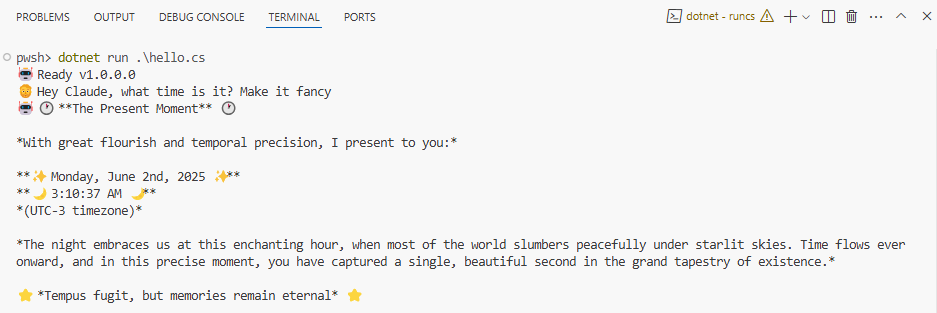
#:package Smith@0.*

var client = new Anthropic.AnthropicClient(Throw.
    Env.Get("Claude:Key") ?? throw new InvalidOperationException("Missing Claude:Key configuration."),
    services.GetRequiredService<IHttpClientFactory>().CreateClient("ai")))
    .UseLogging()
    .UseFunctionInvocation();

var builder = App.CreateBuilder(args);
builder.Services.AddChatClient(new );

var app = builder.Build();

var history = new List<ChatMessage> { new ChatMessage(ChatRole.System, Prompts.System) };
var chat = app.Services.GetRequiredService<IChatClient>();

var options = new ChatOptions
{
    ModelId = "claude-sonnet-4-20250514",
    MaxOutputTokens = 1000,
    Temperature = 0.7f,
    Tools = [AIFunctionFactory.Create(() => DateTime.Now, "get_datetime", "Gets the current date and time on the user's local machine.")]
};

AnsiConsole.MarkupLine($":robot: Ready v{ThisAssembly.Info.Version}");
AnsiConsole.Markup($":person_beard: ");
while (true)
{
    var input = Console.ReadLine()?.Trim();
    if (string.IsNullOrEmpty(input))
        continue;

    history.Add(new ChatMessage(ChatRole.User, input));

    try
    {
        var response = await AnsiConsole.Status().StartAsync(":robot: Thinking...",
            ctx => chat.GetResponseAsync(input, options));

        history.AddRange(response.Messages);
        // Try rendering as formatted markup
        try
        {
            if (response.Text is { Length: > 0 })
                AnsiConsole.MarkupLine($":robot: {response.Text}");
        }
        catch (Exception)
        {
            // Fallback to escaped markup text if rendering fails
            AnsiConsole.MarkupInterpolated($":robot: {response.Text}");
        }

        AnsiConsole.WriteLine();
        AnsiConsole.Markup($":person_beard: ");
    }
    catch (Exception e)
    {
        AnsiConsole.WriteException(e);
    }
}

static class Prompts
{
    public const string System =
        """
        Your responses will be rendered using Spectre.Console.AnsiConsole.Write(new Markup(string text))).
        This means that you can use rich text formatting, colors, and styles in your responses, but you must
        ensure that the text is valid markup syntax.
        """;
}
Configuration / Environment Variables
The Env class provides access to the following variables/configuration automatically:
.envfiles: in local and parent directories~/.envfile: in the user's home directory (%userprofile%\.envon Windows)- All default configuration sources from App Builder:
- Environment variables prefixed with DOTNET_.
- Command-line arguments.
- appsettings.json.
- appsettings.{Environment}.json.
- Secret Manager when the app runs in the Development environment.
- Environment variables.
- Command-line arguments.
Sponsors
Learn more about GitHub Sponsors
Quick Start
Clone the repository
git clone https://github.com/devlooped/smithInstall dependencies
cd smith
npm installFollow the documentation
Check the repository's README.md file for specific installation and usage instructions.
Repository Details
Recommended MCP Servers
Discord MCP
Enable AI assistants to seamlessly interact with Discord servers, channels, and messages.
Knit MCP
Connect AI agents to 200+ SaaS applications and automate workflows.
Apify MCP Server
Deploy and interact with Apify actors for web scraping and data extraction.
BrowserStack MCP
BrowserStack MCP Server for automated testing across multiple browsers.
Zapier MCP
A Zapier server that provides automation capabilities for various apps.